
.png)
Warehouse automation has a vocabulary problem. WMS, WES, RCS, fleet manager, orchestration layer: the terms overlap, vendors use them differently, and it is not always clear what sits where or does what. This guide explains one of them plainly: the orchestration layer, what it is, where it fits, and why a third-party logistics (3PL) operator running robots would need one.
Key takeaways
- A warehouse orchestration layer is software that coordinates robots from different vendors as one system, sitting between your business systems (WMS, WES, ERP) and the robot controllers.
- It is robot-agnostic: FloxMind supports more than 100 robot models across brands, so you are not locked into one vendor.
- It does four jobs: task allocation, traffic and flow management, exception handling, and one live view of the floor.
- You need one once you run, or plan to run, more than one robot type or vendor. It is additive, with no rip-and-replace.
What is a warehouse orchestration layer?
A warehouse orchestration layer is the software that coordinates all of your automation as one system. It sits above the individual robot fleets and directs them, so machines from different vendors, doing different jobs, work together rather than in isolation.
The simplest way to think about it: each robot fleet knows how to do its own job, but none of them can see the whole operation. The orchestration layer is the part that does. It holds the single, live view of the floor and decides what work goes where, so the warehouse behaves like one coordinated operation instead of several automated islands sharing a building.
A good orchestration layer is also robot-agnostic. It works with mixed fleets from any supplier without forcing everything onto one standard. FloxMind's platform, for example, supports more than 100 robot models across multiple brands, so the machines a 3PL has already bought stay in play.
Where the orchestration layer sits
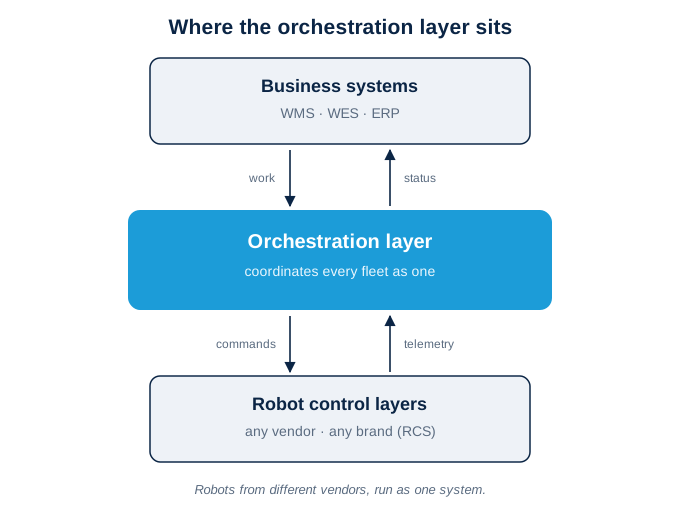
This is the part that clears up most of the confusion. Picture three levels in a warehouse's software:
- At the top, your business systems. The warehouse management system (WMS), warehouse execution system (WES) and ERP. These decide what needs to happen: orders, inventory, priorities.
- At the bottom, the robot control layers. Each vendor's robot control system (RCS) or controller, which runs that vendor's machines.
- In the middle, the orchestration layer. It sits between the two, translating what the business systems want into coordinated action across every fleet, and feeding status back up.
Without that middle layer, your WMS is talking to several separate robot controllers that do not talk to each other. The orchestration layer is what joins them into one chain of command.
What an orchestration layer actually does
In practice, the work falls into four jobs:
- Task allocation. It assigns each piece of work to whichever robot can do it next, across every fleet, regardless of brand.
- Traffic and flow management. It applies routing rules and conflict avoidance across mixed fleets, so machines stop competing for the same aisle or blocking each other.
- Exception handling. When conditions change, whether that is congestion, a fault or a spike in volume, it reprioritises and adapts without someone manually reconfiguring the system.
- Observability. It gives you one live view of fleet status, telemetry and logs, so you can see what the automation is doing and why.
How it differs from a WMS, a WES and robot control software
A quick way to keep the layers straight:
- A WMS manages inventory and orders. It knows what is in the building and what needs to ship. It does not direct robots.
- A WES sequences and releases work to the floor, and is often tied to a specific automation setup. It is closer to the action than a WMS, but it is not built to coordinate mixed fleets from different vendors as one system.
- Robot control software (RCS) runs a single vendor's machines, and only those.
- An orchestration layer is the part that makes all of the above work together across vendors, and gives the whole floor one brain.
The distinction operators ask about most is the WES versus orchestration one. The short version: a WES executes work within a system, an orchestration layer coordinates across systems and vendors. [At publish: link this sentence to the WES vs orchestration layer piece.]
Why warehouses need one: the coordination gap
Two architectural problems are why orchestration exists as a category at all.
The first is siloed fleets. Most robots ship with control software built to run that vendor's machines, not to hand work to a competitor's robot or share traffic rules across a mixed fleet. Run more than one vendor and you get several automated islands rather than one warehouse.
The second is central control. Many traditional systems route every decision through one central controller, which becomes a bottleneck and a single point of fragility as you add robots and zones. FloxMind distributes the intelligence across the floor instead, using edge computing so decisions are made close to where the work happens. As they put it, the goal is "removing the coordination layer that breaks at scale."
What good looks like
Not every orchestration layer is equal. The features that matter for a 3PL are:
- Robot-agnostic, so you are not locked into one hardware vendor.
- Decentralised intelligence, so there is no central bottleneck as you scale, whether that is a handful of robots or 500 and more.
- Additive, not rip-and-replace. You keep your existing WMS and the robots you have, and you do not need an in-house robotics team to run it.
- A commercial model that scales with you. A subscription, operating-expenditure approach rather than a large up-front capital project, deployed in phases so you prove the value before you scale.
Done well, the payoff is the gap between what your robots manage in isolation and what they deliver together. FloxMind reports throughput improvements of 20 to 40%, labour-cost reductions of up to 70%, and system uptime of 98% or higher.
The takeaway
A warehouse orchestration layer is the coordination brain that turns a collection of separate robot fleets into one operation. It sits between your business systems and your robot controllers, allocates and balances work across every fleet, and is what lets a mixed-vendor warehouse run as a single system rather than a set of islands. If you are running more than one type of robot, or planning to, it is the layer that decides whether the automation delivers.
To see how this works in practice, read how FloxMind's technology coordinates mixed fleets, why FloxMind approaches automation this way, or book a technical demo.
FAQ
Does a warehouse orchestration layer replace my WMS?
No. It is additive. You keep your existing warehouse management system (WMS); the orchestration layer sits beneath it and coordinates the robots rather than replacing anything.
Do I need an orchestration layer if I only run one robot vendor?
Usually not. If you run a single vendor's fleet on its own control system, you may not need a separate coordination layer yet. The value appears once you are running mixed fleets, or planning to, where no single vendor's software can coordinate the others.
Is an orchestration layer software I run myself, or a managed service?
With FloxMind it is a managed, subscription service. The platform handles the coordination and FloxMind runs and supports it, so you do not need an in-house robotics team.
Can it work with robots I have already installed?
Yes. A robot-agnostic layer works with mixed fleets from any supplier. FloxMind supports more than 100 robot models across multiple brands, so the machines you have already bought stay in play.
How quickly can it be deployed?
Deployment is phased: a short evaluation, then a pilot in one area measured against agreed targets, then a wider rollout. Onboarding can be completed in less than one week, with the pilot and rollout following in stages.
Related reading: How FloxMind works · Who we help